
Attendance Office

To Report Your Student Absent
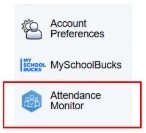
  1. Log into your Parent Portal account on the Parent Portal website at https://bridgewater-raritan.powerschool.com/public/  through a web browser on your computer or mobile device.  Attendance reporting is not available through the Parent Portal App.

  2. Select Attendance Monitor from the bottom of the left side menu

  3. Click the blue Report New Attendance button 

    • Enter the dates of your student’s absence in the Absence Date boxes

    • If your student is absent for only one day or part of a day, the date should be the same in both boxes.  

    • For Partial Day absences, enter the start and end time of the absence. 

    • Select an absence reason from the dropdown menu

    • Enter a brief explanation for the absence

    • Click the blue submit button. 

Attendance for the same day must be reported by 1 pm.  After 1 pm, please call the Attendance Office. 908-231-8660 - Option 1. 

All additional documentation (such as doctor’s notes or appointment confirmations) must be submitted to the Attendance Office within 5 days of the student’s return. You may email this documentation and information about past absences to: highschoolabsences@brrsd.k12.nj.us.   

For specific information regarding the attendance process or procedures, please refer to the Student Handbook.

Additional Parent Portal directions can be found here.